
Every clip in this test uses the exact same settings — 8 seconds, 720p, 16:9 — so the comparison stays fair. We kept everything at Veo 3.1 Fast's maximum length, which means no model got extra room to hide its weaknesses.
The three models at a glance
These aren't three versions of the same thing. They're built for different jobs, and knowing which is which saves you a lot of trial and error.
Veo 3.1 Fast — Google's speed-first option
Google DeepMind splits Veo 3.1 into Quality and Fast tiers. Fast is designed to be quicker and cheaper while keeping nearly the same specs. Curious Refuge Labs scored it 6.9/10 overall, with prompt adherence as the standout at 7.3/10 — on par with the Quality tier. The rest: temporal consistency 6.5, visual fidelity 7.1, motion quality 6.9, cinematic realism 6.5. Their takeaway: the gap to Quality is smaller than you'd expect, and the price gap is not. In VidLux, Veo 3.1 Fast outputs 4, 6, or 8-second clips at up to 1080p.
Kling 3.0 Turbo — Kuaishou's volume workhorse
Released June 17, 2026, Kling 3.0 Turbo is the speed-tuned variant of Kling 3.0. Two features actually matter here: multi-shot prompting (define up to 6 shots in one prompt, and the model handles the transitions — no stitching in post) and vCoT scene reasoning (it thinks through the scene logic before rendering, so camera moves, lighting, and subject behavior land more reliably than on the 2.x line). The 3.0 generation also improved lip sync and long-clip stability. In VidLux it runs 3–15 seconds at 720p/1080p.
Seedance 2.0 Mini — ByteDance's lightweight
Seedance 2.0 Mini is the budget-friendly member of the Seedance 2.0 family: faster and cheaper per clip, sharing the same multimodal inputs as the standard model (image, video, and audio references) but capped at 480p/720p with 4–15 second clips in VidLux. There's almost no official material on it — which is exactly why its results here are worth paying attention to. No hype, just output.
Duration tiers and cost (why we settled on 8 seconds)
The single most overlooked difference between these models is how long each one can generate in one go:
| Model | Duration options | Cost at 720p / 8s |
|---|---|---|
| Veo 3.1 Fast | 4 / 6 / 8 seconds only | 30 credits |
| Kling 3.0 Turbo | 3–15 seconds (13 steps) | 120 credits |
| Seedance 2.0 Mini | 4–15 seconds (12 steps) | 160 credits |
Veo 3.1 Fast tops out at 8 seconds, but that 8-second clip costs just 30 credits — about 4x cheaper than Kling 3.0 Turbo and 5x cheaper than Seedance 2.0 Mini. If your content is short-form anyway (social clips, product shots, reaction videos), Veo 3.1 Fast is the value pick. You only need Kling or Seedance when you need one continuous shot longer than 8 seconds.
That's also why every comparison here uses 8 seconds: it's the only length where all three models compete on equal footing.
What each model can actually do
The input options differ too, and this matters before you even start generating:
| Mode | Veo 3.1 Fast | Kling 3.0 Turbo | Seedance 2.0 Mini |
|---|---|---|---|
| Text to video | ✅ | ✅ | ✅ |
| Image to video | ✅ | ✅ | ✅ |
| Reference to video (images) | ✅ (up to 3) | ❌ Not supported | ✅ (up to 9) |
| Reference to video (audio) | ❌ Not supported | ❌ Not supported | ✅ (up to 3) |
| Reference to video (video) | ❌ Not supported | ❌ Not supported | ✅ (up to 3) |
Two things stand out:
- Kling 3.0 Turbo has no reference-to-video at all. It works from text and a single image. If you need to generate from reference material, it's out of the running immediately.
- Seedance 2.0 Mini is the only one that accepts audio and video references — on top of up to 9 reference images, it can take 3 reference videos and 3 reference audio clips. It can match the motion or camera work of a video you provide, or the rhythm of an audio clip. Neither Veo nor Kling offers that input dimension. So the reference-to-video test below is really a two-horse race: Veo 3.1 Fast (images only) vs Seedance 2.0 Mini (full multimodal).
How we tested
Every test follows the same rules:
- Identical settings: 8 seconds, 720p, 16:9 across the board (Veo 3.1 Fast's ceiling)
- Identical inputs: the same prompt for all three models in each test; image-to-video tests share the same input image, generated with GPT Image 2
- Identical evaluation: frame-by-frame analysis of every clip (motion volume, cut points, face stability), combined with direct visual review of the footage
- Four modes covered: text-to-video (2 tests), image-to-video (2 tests), reference-to-video (1 test), plus a multi-beat story as a bonus
All test assets were generated with VidLux's own image model (GPT Image 2), so the inputs are reproducible — anyone can run the same tests.
The verdict
| Test | Stronger result | What separated them |
|---|---|---|
| Text to video: courier tracking | Kling 3.0 Turbo | Cleanest acceleration phase at the end; most complete camera-instruction coverage |
| Text to video: rainy street | Seedance 2.0 Mini | The pause-and-look-up beat landed best; steadiest face |
| Image to video: stadium selfie | Split | Kling 3.0 Turbo held the face best; Veo 3.1 Fast moved most but fragmented the frame |
| Image to video: perfume bottle | Kling 3.0 Turbo | Lowest motion volume — closest to a locked-off product shot |
| Reference to video: two characters | Seedance 2.0 Mini | Both handled two characters fine; Seedance adds audio/video reference inputs nobody else has |
| Multi-beat story (paper boat) | Seedance 2.0 Mini | Three evenly paced scene changes; clearest story beats |
Bottom line: want stability, pick Kling 3.0 Turbo. Want value, pick Veo 3.1 Fast. Want reference control, pick Seedance 2.0 Mini. The evidence is below.
Text to video: courier tracking
All three models got the same prompt: one continuous tracking shot of a courier emerging from a market lane, swinging around a delivery van, passing the camera, and being chased by a pan. This tests motion continuity and how well each model follows camera instructions.
Show the courier prompt used for all three models
One continuous street-level tracking shot at blue hour. A bicycle courier wearing a faded red jacket turns out of a narrow neighborhood market lane, leans around a slow delivery van, then accelerates past the camera as it pans and keeps pace beside him. Shopkeepers pull down metal shutters and two pedestrians step aside naturally. Wet pavement, ordinary storefront lighting, slight handheld movement, realistic wheel rotation, body balance and motion blur. Keep the same rider, bicycle, jacket and street layout throughout. Ambient traffic, bicycle chain and tires on wet road. No cuts, no slow motion, no text, no logos.
| Metric | Veo 3.1 Fast | Kling 3.0 Turbo | Seedance 2.0 Mini |
|---|---|---|---|
| Motion volume (mean) | 14.6 | 9.1 | 10.1 |
| Rhythm, early/mid/late | 12.2 / 17.2 / 14.6 | 3.1 / 11.4 / 12.8 | 9.6 / 9.7 / 11.0 |
| Face drift, X axis | 78.4% | 71.7% | 58.7% |
Kling 3.0 Turbo's motion curve actually tells the story: quiet at the start (3.1, courier barely visible), busier mid-shot (11.4, swinging around the van), strongest at the end (12.8, the acceleration). That maps directly onto the three beats in the prompt. Veo 3.1 Fast moved the most overall (14.6) but stayed at roughly the same pace the whole way — plenty of motion, no build. Seedance 2.0 Mini sat in the middle, covering the actions without much rhythmic shape.
Kling 3.0 Turbo wins this one on completeness — not by moving more, but by moving at the right moments.
Text to video: rainy street
Same prompt for all three: a woman in a mustard-yellow raincoat walks a rainy side street at night, stops under a red awning, and looks up at the neon reflections. This tests cinematic feel and performance timing.
Show the rainy street prompt used for all three models
Medium-wide cinematic shot of a woman in a mustard-yellow raincoat walking through a rainy city side street at night. She pauses under a red awning and looks up as neon reflections ripple across the wet pavement. Slow dolly-in, natural body motion, realistic face, consistent clothing, ambient rain, no text, no logos.
| Metric | Veo 3.1 Fast | Kling 3.0 Turbo | Seedance 2.0 Mini |
|---|---|---|---|
| Motion volume (mean) | 4.0 | 4.0 | 5.4 |
| Mid-clip rhythm | 5.0 | 4.3 | 8.2 |
| Face drift, X axis | 26.6% | 36.2% | 14.2% |
| Face drift, Y axis | 11.3% | 11.6% | 19.2% |
Seedance 2.0 Mini's mid-clip spike (8.2) is the pause-and-look-up beat — the one performance moment that actually reads as deliberate. Its face drift (14.2%) is also the lowest of the three as the camera pushes in. Kling 3.0 Turbo has one hard cut at about 3.25s, probably a lighting change under the awning; Veo 3.1 Fast is steady but the performance stays timid.
Seedance reads as the strongest performance here: walk, stop, look up, neon reflections — all in one coherent beat.
Image to video: stadium selfie
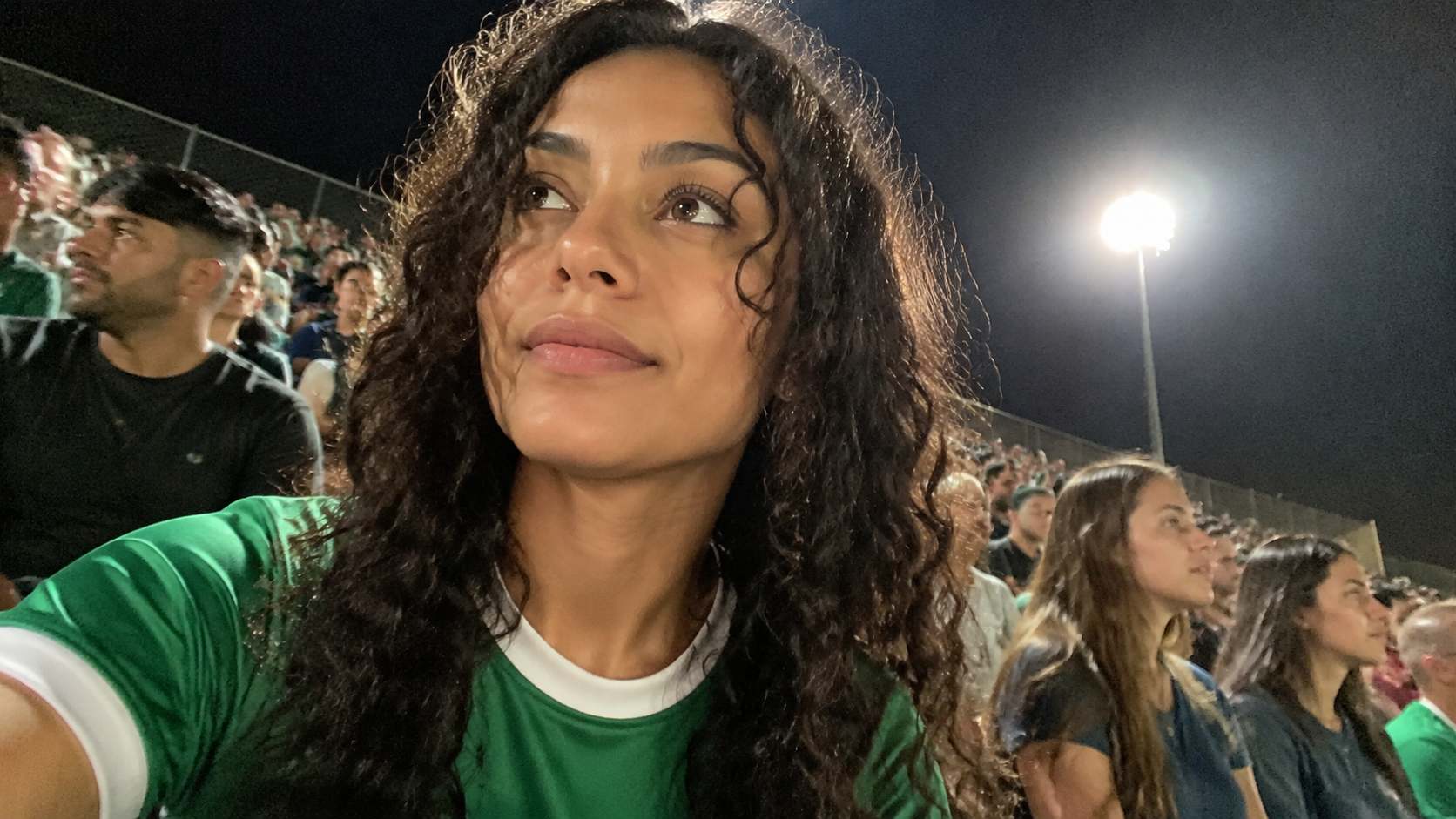
We generated a night-stadium selfie with GPT Image 2, then fed that exact same image to all three models. The prompt: react to an off-camera goal, turn the phone to the crowd, come back to the selfie. This tests face stability and identity retention.
Show the stadium prompt used for all three models
The woman hears a goal happen off-camera and the crowd erupts. She reacts instantly with a surprised laugh, jumps slightly, then turns her phone toward the cheering crowd for a moment and back to her face. Natural blinking and arm movement, realistic low-light grain, slight exposure shifts under stadium floodlights, motion blur during the sudden reaction, candid smartphone realism, no cinematic camera movement. Sound: crowd murmur, a sudden loud cheer, and her natural laugh. No cuts, no text, no logos.
| Metric | Veo 3.1 Fast | Kling 3.0 Turbo | Seedance 2.0 Mini |
|---|---|---|---|
| Motion volume (mean) | 13.3 | 6.5 | 10.7 |
| Visible cut points | 18 | 0 | 12 |
| Face drift, X axis | 47.0% | 16.6% | 51.8% |
| Face drift, Y axis | 32.5% | 12.1% | 36.7% |
Each model has a clear weakness here:
- Veo 3.1 Fast: the most motion (13.3) and the full reaction sequence — cheer, phone turn, return to selfie. But the frame falls apart with 18 visible cut points, concentrated around 3s and 5s, and stray objects keep appearing during the phone turn. Fullest action, messiest frame.
- Kling 3.0 Turbo: the least motion (6.5) and the lowest face drift of the bunch (X 16.6% / Y 12.1%). The face simply doesn't break. The trade-off: the cheer lands with less punch.
- Seedance 2.0 Mini: in the middle (10.7), with 12 cut points clustered in the cheer burst (3.7–4.9s). Strong emotional impact, but the face distorts during big expressions.
In short: Kling 3.0 Turbo is the pick for a stable face, Veo 3.1 Fast for full action (fragments accepted), and Seedance 2.0 Mini for raw emotion.
Image to video: perfume bottle
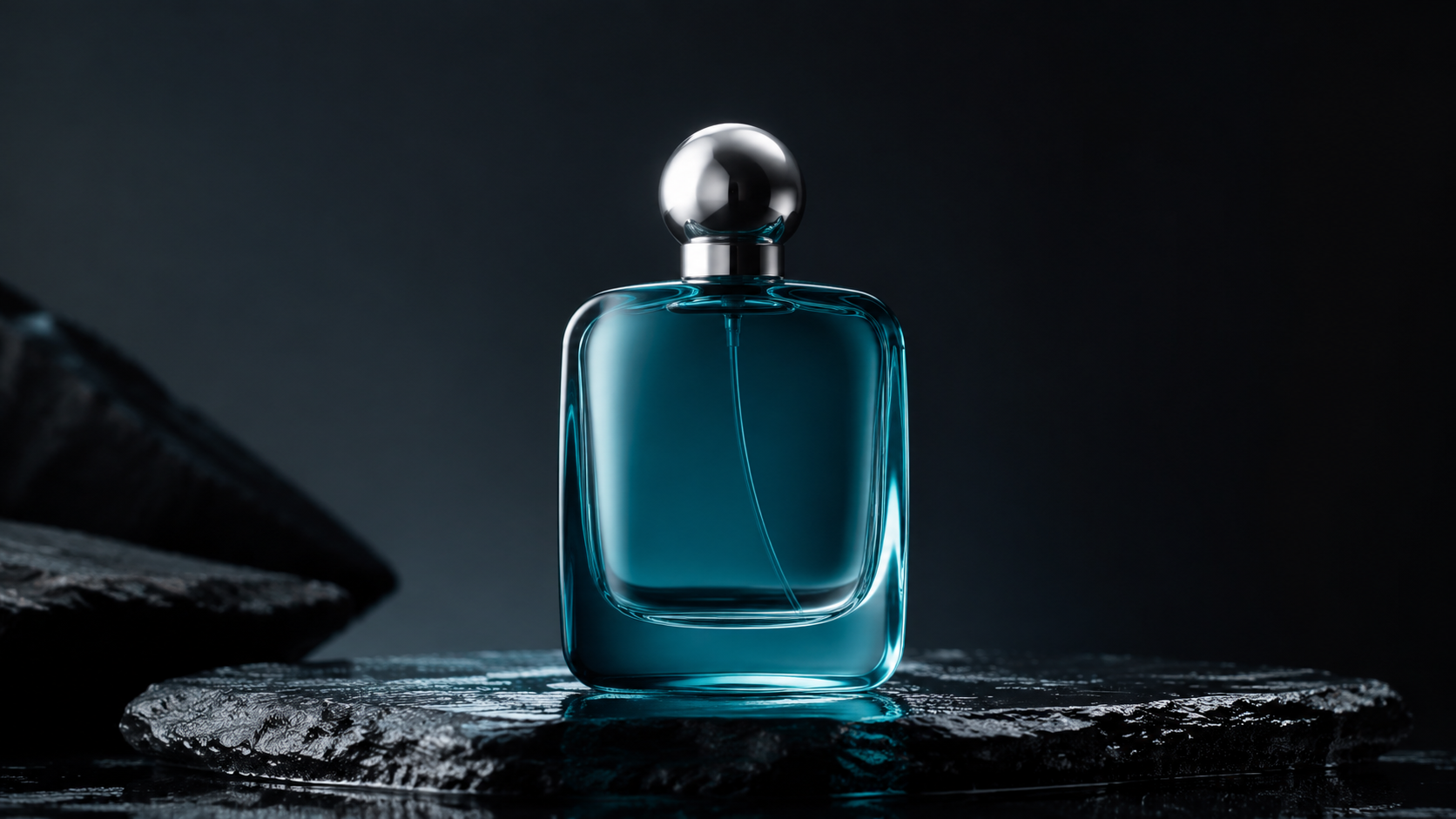
The same GPT Image 2 product shot fed to all three models, with an orbit move. This tests object consistency and product-shot polish.
Show the perfume prompt used for all three models
The camera makes a slow 120-degree orbit around the bottle while a narrow light sweeps across the glass. Keep the bottle shape, cap, reflections, and proportions consistent. Premium commercial lighting, no hands, no text, no logos.
| Metric | Veo 3.1 Fast | Kling 3.0 Turbo | Seedance 2.0 Mini |
|---|---|---|---|
| Motion volume (mean) | 2.0 | 1.5 | 2.6 |
| Motion peak | 2.4 | 2.1 | 4.6 |
Product shots are the quietest test of the bunch: all three models move very little (1.5–2.6), because the subject is a static bottle. The differences are in the details. Kling 3.0 Turbo sits lowest (1.5) — closest to a locked-off product camera, bottle rock solid. Seedance 2.0 Mini has the highest peak (4.6), so its orbit reads the most clearly, with a sense of the bottle rotating. Veo 3.1 Fast is steady but its orbit is the most timid.
For e-commerce product work: Kling for stability, Seedance for a visible orbit.
Reference to video: two characters + a scene
This test uses 3 GPT Image 2 reference images: character A (woman in a cream knit sweater), character B (man with glasses in a dark olive jacket), and a scene (a modern cafe interior). The prompt puts both characters in that cafe, chatting face to face.
Quick note on how reference-to-video works: the references define who and where; the prompt defines what happens. The model pulls faces, hairstyles, and outfits from the character images, takes the environment from the scene image, then generates the action described in the prompt. This test is deliberately harder: both identities have to stay straight, and the scene has to match.
Note: Kling 3.0 Turbo doesn't support reference-to-video, so this round is Veo 3.1 Fast vs Seedance 2.0 Mini only.



Show the reference-to-video prompt
The young woman in the cream knit sweater and the man with glasses in the dark olive jacket are sitting across from each other at a small wooden table inside a cozy modern cafe with large windows and warm pendant lights, matching the cafe interior in the reference image. She laughs while telling a story, he listens and smiles, then they both raise their coffee cups for a toast. Keep both faces, hairstyles and outfits consistent. Natural conversational movements, warm afternoon light through the window. No text, no logos.
| Metric | Veo 3.1 Fast | Seedance 2.0 Mini |
|---|---|---|
| Motion volume (mean) | 3.1 | 6.4 |
| Faces detected throughout | 100% | 100% |
Both models handled the two-character-plus-scene load without falling apart. Veo 3.1 Fast stays quieter (3.1, near-conversation-stillness) with both characters and the cafe rendered cleanly. Seedance 2.0 Mini moves more (6.4 — bigger gestures, the toast, more laughter), and the two characters stay consistent and well-separated.
This is also where the mode table above pays off: Seedance 2.0 Mini is the only model that accepts audio and video references on top of images, so it's the only one that can follow a reference clip's motion or a reference audio's rhythm. If controllable, reference-driven generation is the goal, Seedance 2.0 Mini is the only serious option here.
Bonus: the paper-boat story (multi-beat narrative)
The courier and rainy-street tests cover single-shot ability. This bonus test covers multi-beat storytelling: the prompt has three beats — a red paper boat hides from rain, rescues a firefly, and reaches warm water with the other boats. All three models get 8 seconds. Who fits three beats into the same capacity most cleanly?
Show the paper-boat prompt used for all three models
A cinematic animated short in three connected shots about a tiny red paper boat that is afraid of rain. First shot: at blue-hour dusk, the red paper boat hides under a curled green leaf beside a rain-filled street gutter while several blue paper boats race past. The boat trembles as large drops hit the pavement. Second shot: a sudden stream carries a stranded glowing firefly toward a drain. The red boat sails out, catches the firefly beneath its folded paper sail, and turns across the current. Third shot: the storm softens. The red boat and firefly glide into a warm city-square reflection as the other paper boats gather around. The firefly rises and lights the scene; end on the red boat looking proud. Ambient rain and water sounds only. Keep the same red boat shape, fold lines, scale, and painted eyes in every shot. No music, no singing, no text, no logos.
| Metric | Veo 3.1 Fast | Kling 3.0 Turbo | Seedance 2.0 Mini |
|---|---|---|---|
| Visible cut points | 1 (at 4.2s) | 2 (2.3s, 5.0s) | 3 (1.8s, 4.4s, 7.6s) |
| Rhythm, early/mid/late | 14.1 / 13.7 / 7.2 | 4.9 / 5.3 / 3.3 | 8.0 / 7.7 / 8.8 |
| Motion volume (mean) | 11.6 | 4.5 | 8.2 |
Even at a fixed 8 seconds, Seedance 2.0 Mini still splits the three beats most cleanly: cut points at roughly 1.8s, 4.4s, and 7.6s, with near-uniform pacing (8.0 / 7.7 / 8.8) — shelter under the leaf, the rescue at the drain, the warm ending all read clearly.
Kling 3.0 Turbo lands two cuts (about 2.3s and 5.0s) with the steadiest motion overall, just one beat short of Seedance. Veo 3.1 Fast manages only one clear cut (about 4.2s), with dense early motion (14.1 / 13.7) that trails off hard (7.2) — the three beats collapse into "continuous action, then an ending."
So even with the duration variable removed, multi-beat storytelling is Seedance 2.0 Mini's lane, Kling 3.0 Turbo is the steady second, and Veo 3.1 Fast is better pointed at a single continuous action than at packing in story beats.
Side-by-side comparison
| Category | Veo 3.1 Fast | Kling 3.0 Turbo | Seedance 2.0 Mini |
|---|---|---|---|
| Price (720p / 8s) | 30 credits | 120 credits | 160 credits |
| Duration options | 4/6/8s only | 3–15s | 4–15s |
| Reference to video | Images only (≤3) | Not supported | Images + audio + video |
| People | Full action, fragmented frame | Steadiest face | Strongest emotion, faces distort on big expressions |
| Motion | Most motion, flat rhythm | Best completion, real build | Stable, flatter rhythm |
| Product shots | Steady | Closest to locked-off | Strongest orbit |
| Multi-beat story | One continuous action | Two cuts, steady | Three cuts, most even pacing |
| Reference character hold | Drifts noticeably | — | Rock solid |
Which one should you use?
- On a budget, shooting short-form → Veo 3.1 Fast. 8 seconds for 30 credits is the cheapest way in, and its prompt adherence and action coverage are solid. Social clips, product shots, reaction content — start here.
- Faces must hold, shots must run long → Kling 3.0 Turbo. Best facial stability in the test, 3–15 second range, and the most complete camera-instruction coverage. People-focused video and long tracking shots — start here.
- Reference control is the job → Seedance 2.0 Mini. The only model that takes image, audio, and video references, with rock-solid character retention in reference mode and the cleanest multi-beat storytelling. Any "generate from this material" workflow — start here.
There's no best model, only the right fit. Veo 3.1 Fast is the value pick, Kling 3.0 Turbo is the stability pick, and Seedance 2.0 Mini is the reference-control pick. Choose by your use case, not by name recognition.